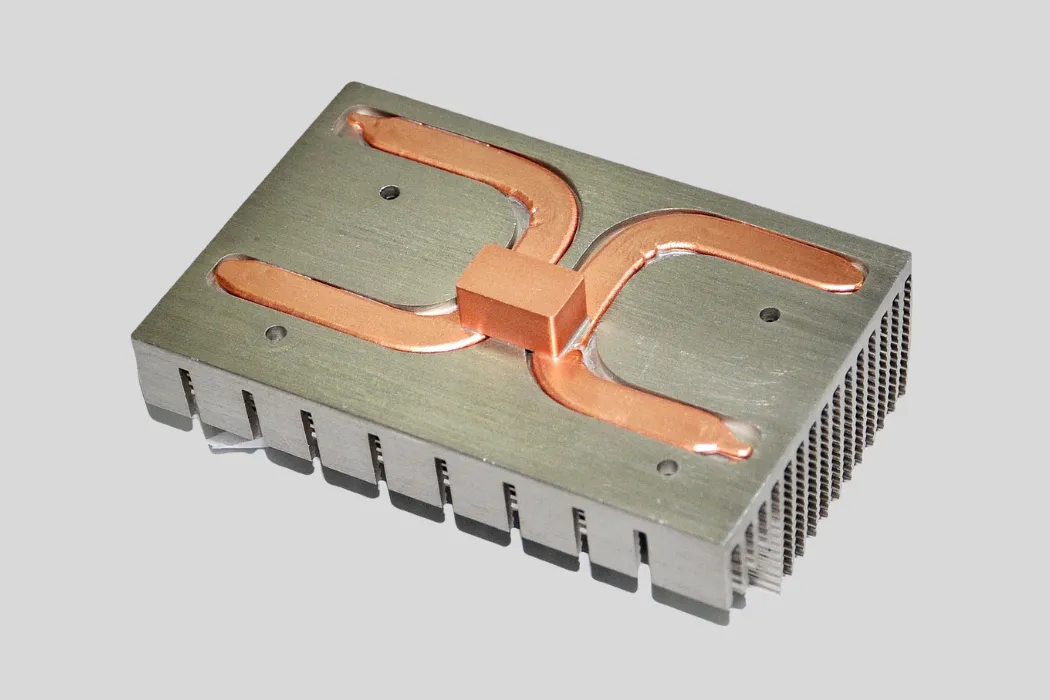
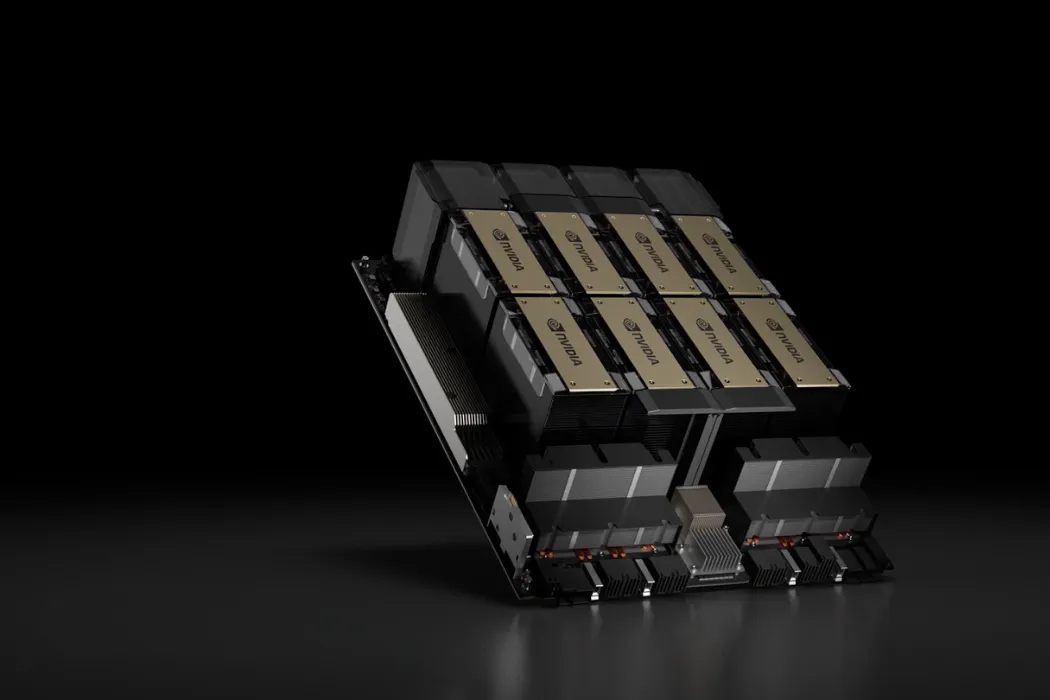
Correction Time: It’s “Sink,” Not “Sync”
Many beginners mishear and mistype “heat sink” as “heat sync,” leading to confusion about how these parts actually manage heat in electronics. Understanding the correct term—and what the component does—is the first step toward choosing the right cooling design for CPUs, GPUs, or industrial systems.
This guide explains what a heat sink is, how it differs from a heat spreader, and why both are essential to the thermal chain. It helps new builders and engineers understand how these parts work together to keep hardware safe, efficient, and long-lasting.
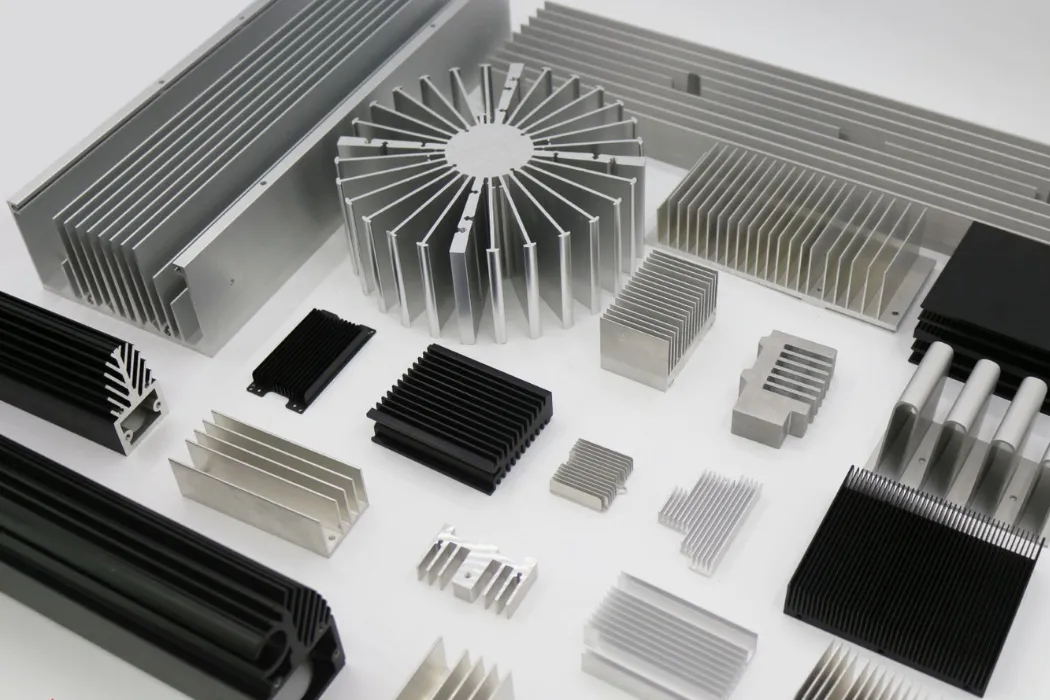
Correction Time: It’s “Sink,” Not “Sync”
The correct term is “heat sink”, not “heat sync.” A heat sink is a device that removes heat from electronic components to prevent overheating, while “sync” relates to synchronization and is unrelated to cooling.
Many new PC builders or electronics beginners mistakenly call a heat sink a “heat sync.” It’s a common mix-up since the two sound similar, but they mean completely different things. Let’s clear it up by exploring what a heat sink really is and how it works in thermal management.
Understanding What a Heat Sink Is
A heat sink is a thermal component used to absorb and dissipate heat from high-power devices like CPUs, GPUs, and power modules. It acts like a bridge that transfers heat away from the component into the surrounding air.
- 💡 Passive heat sinks rely on natural airflow, using materials like aluminum or copper to shed heat.
- 🚀 Active heat sinks combine a heatsink with a fan, improving air circulation and cooling efficiency.
- ⚠️ The term “sync,” short for synchronization, deals with timing between electronic signals, not thermal management.
In our experience at Walmate Thermal, even small design differences—like fin density or airflow direction—can make large changes in cooling results.
Key Technical Data About Heat Sinks
Different materials and designs define how effectively a heat sink works. The most common metals are aluminum and copper, each with distinct conductivity properties and weight characteristics.
| Specification / Comparison | Details | Icon |
|---|---|---|
| Thermal conductivity (Aluminum vs Copper) | Aluminum ≈ 205 W/mK; Copper ≈ 385 W/mK | ✅ |
| Finned structure advantage | Increases surface area up to 10× compared to flat plates | 🚀 |
| Active vs Passive capacity | Active handles loads over 250 W; Passive under 50 W | ⚙️ |
| Passive size requirement | Usually 30–50% larger for same performance | ⚠️ |
| Thermal Interface Material (TIM) | Reduces thermal resistance by up to 50%, dropping temperature 5–10 °C | 💡 |
These values guide thermal engineers in selecting the right combination of metal, structure, and cooling power. Walmate Thermal often designs aluminum heat sinks for lightweight applications and copper ones for high-power density systems.
Critical Perspective on Heat Sink Usage and Misconceptions
People often say “heat sync” thinking it’s correct, but the right term is “heat sink.” The confusion comes from how similarly they sound. In electronics, synchronization and cooling are unrelated concepts.
- ⚠️ Thermal paste (or TIM) only improves contact between surfaces; it does not lower temperature by itself.
- ✅ A good cooling system uses both a properly sized heat sink and an even layer of TIM.
- 🚀 Active heat sinks are compact and ideal for CPUs or GPUs with high thermal loads.
- 💡 Passive heat sinks work well where silence or simplicity is a priority, though they need more surface area.
Choosing the right thermal solution directly affects performance and reliability. In our experience, Walmate Thermal designs custom systems where heat sink geometry, airflow paths, and material choice match the real thermal demands of each device. That’s the difference between “just cooling” and engineering dependable, long-life solutions.
The Difference: Heat Spreader (IHS) vs. Heat Sink
A heat spreader (IHS) distributes heat evenly across a device’s surface, while a heat sink actively dissipates heat into the environment using fins and airflow. Heat sinks are essential for high-power components, whereas heat spreaders are used for compact, low-power devices or as a preparatory layer for further cooling.
Many new engineers or PC builders often confuse a heat spreader (or integrated heat spreader, IHS) with a heat sink or “heat sync.” In our experience at Walmate Thermal, distinguishing their roles helps in designing proper cooling systems for different components.
Key Comparison of Heat Spreader (IHS) and Heat Sink
The table below outlines their structural, functional, and cost differences, making it easier to understand where each type fits in a thermal solution.
| Feature | Heat Spreader (IHS) | Heat Sink |
|---|---|---|
| Main Function | Distributes heat across surface | Dissipates heat into environment |
| Structure | Flat plate, no fins | Fins for larger surface area |
| Typical Materials | Copper or graphite | Aluminum or copper |
| Thickness | 1–3 mm | 10–50 mm |
| Cooling Mechanism | Conduction | Convection and radiation |
| Integration | Soldered onto chip die | Mounted using paste or pads |
| Fan Support | ❌ No | ✅ Yes, via mounting holes |
| Cost Range | $1–$10 per unit | $5–$50 per unit |
| Weight | <10 g | 50–500 g |
| Use Case | CPUs, RAM, SSDs | CPUs, GPUs, power electronics |
| Pros & Cons | ✅ Compact, even heat spread ❌ Needs extra cooling |
✅ High heat dissipation ❌ Bulkier and airflow-dependent |
Deep Dive: Functions and Roles in Thermal Management
In a thermal system, the IHS is the bridge between the silicon die and the cooling device. It prevents hotspots by transferring heat laterally across the surface, helping maintain uniform temperature distribution.
Serving as a pre-cooling layer, the heat spreader makes it easier for heat sinks or fans to extract heat through conduction. The role becomes more critical in chips using advanced packaging, where direct contact with the die is limited.
Heat sinks, on the other hand, are typically the visible finned structures that release heat into the air. In high-power systems, where energy output can exceed 100W and temperatures reach 70°C–85°C, heat sinks and fans work together for safe operation.
For low-power modules such as RAM or SSDs, a small heat spreader is often sufficient. At Walmate Thermal, we optimize both IHS and sink designs using simulation tools and material analysis to ensure durability and performance.
Common Misconceptions and Expert Advice
- ⚠️ Misconception: Believing an IHS alone can cool a processor. Without a heat sink, the chip will overheat quickly.
- ⚠️ Misconception: Thinking heat spreaders and heat sinks are the same. Only heat sinks actively remove heat into the environment.
- 💡 Expert Advice: For high-performance CPUs, always pair the IHS with a well-sized heat sink or fan system, and maintain steady airflow.
- 💡 Tip: For compact or low-power systems, using a heat spreader alone may be enough, but temperature monitoring is vital to prevent throttling.
In our engineering projects across EVs, AI servers, and industrial automation, we’ve seen that a balanced system combining both types leads to reliable long-term operation. Walmate Thermal designs each “heat sync” and spreader solution according to the specific power, size, and environment of the application.
The Heat Spreader: Moving the Hotspot (The Bridge)
A heat spreader acts as a bridge between a heat-generating component (the hotspot) and the next stage of cooling, rapidly distributing heat across a larger surface area to prevent localized overheating and prepare it for dissipation by a heat sink or other cooling solution.
The heat spreader is one of the most misunderstood yet essential parts of any thermal management system. Many beginners confuse it with the heat sync or cooler tower, but in reality, it serves a very different function. In our experience at Walmate Thermal, understanding how this component works is the foundation for building efficient cooling systems that prevent performance loss and long-term damage.
What Is a Heat Spreader?
A heat spreader is a passive thermal component positioned right on top of a heat source such as a CPU die or power semiconductor. Its primary job is to even out heat distribution across a broader surface before that heat reaches the cooler or the next thermal layer.
Unlike a heat sync, it does not release heat directly into the air. Instead, it spreads the heat laterally, reducing localized temperature peaks that can degrade sensitive components. By providing this even distribution, the heat spreader allows downstream cooling parts like heat sinks or liquid plates to work more efficiently and keep overall system temperature under control.
Materials, Design, and Placement
The choice of material and design has a direct effect on performance. Common heat spreader materials have very different thermal conductivities and cost implications, as shown below:
| Material | Thermal Conductivity (W/m·K) | Characteristics |
|---|---|---|
| Copper | ≈400 | ✅ Excellent heat conduction, but heavier and more expensive. |
| Aluminum | ≈205 | ✅ Lightweight and cost-effective; ⚠️ less conductive than copper. |
| Synthetic Diamond | Up to 2000 | 🚀 Exceptional conductivity; ⚠️ costly and used in high-performance designs. |
Most heat spreaders measure between 0.5 mm and 5 mm thick, making them thin enough for compact electronic assemblies. In physical structure, they are flat and designed to ensure maximum surface contact with both the heat source below and the heat sync above.
In Walmate Thermal’s designs, the spreader rests between the “hotspot” and the next cooling stage, creating a seamless thermal bridge for controlled temperature transfer throughout high-power modules.
Why Heat Spreaders Are Crucial in Thermal Management
One common misconception is that heat spreaders actively cool components. They do not. Instead, their purpose is to spread heat evenly across the device to prevent hotspot formation. This uniform heat layer allows the heat sync or cooler to manage a stable and predictable thermal load.
- ✅ They improve the efficiency of downstream technologies such as fans, liquid plates, and radiators by presenting a larger contact surface.
- 💡 The material and thickness chosen directly influence how reliable the device remains under sustained operation.
- ⚠️ Without proper spreading, even the best cooling assembly can struggle with uneven heating that leads to thermal degradation.
In our experience, pairing a high-quality heat spreader with precision heat syncs designed by Walmate Thermal delivers balanced, long-lasting cooling systems across industries—from electric vehicle inverters to AI servers. The spreader’s ability to act as the thermal bridge ensures that heat moves predictably, preventing performance drop and extending the system’s service life.
Unlock Precision Thermal Management with Walmate’s Expert Solutions
Leverage nearly 20 years of industry-leading R&D and manufacturing expertise to optimize your product’s performance and efficiency. Partner with Walmate for tailored thermal management solutions engineered to keep your systems cool and reliable.
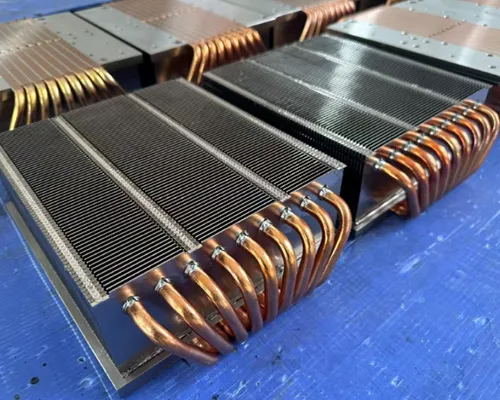
The Heat Sink: Dumping the Energy (The Destination)
A heat sink is a component designed to absorb and dissipate excess thermal energy from electronic devices into the surrounding environment, preventing overheating and ensuring stable operation. Its effectiveness depends on material, surface area, and airflow, with advanced designs now achieving up to 50% weight reduction while maintaining equivalent cooling performance.
The heat sink, sometimes mistakenly called a “heat sync,” is one of the most recognizable components in any thermal management system. It serves as the destination for waste heat, helping electronics maintain safe operating temperatures and ensuring reliability. Walmate Thermal’s nearly two decades of design and manufacturing experience play a central role in developing advanced and lightweight heat sink systems for industries ranging from EVs to AI servers.
The Role of the Heat Sink in Thermal Management
Heat sinks act as the main pathways that transfer waste heat from sensitive components into the surrounding air or fluid. This process occurs through a combination of conduction, convection, and radiation.
Without effective dissipation, electronic parts overheat, leading to reliability issues—failure rates increase by roughly 2x for each 10°C rise in temperature. In our experience at Walmate Thermal, well-designed heat sinks can extend product lifetime by approximately 4% for every 1°C temperature reduction.
Material Choices and Thermal Conductivity
Material selection drives both the performance and cost of a heat sink. Each option has trade-offs between conductivity, density, and expense. The following table highlights key comparisons.
| Material | Thermal Conductivity | Weight / Cost Notes | Applications |
|---|---|---|---|
| Copper | ~400 W/(m·K) | ❌ Heavy, ❌ Expensive | High-power electronics |
| Aluminum | ~237 W/(m·K) | ✅ Light, ✅ Cost-effective | General-purpose cooling |
| Graphite | ~370 W/(m·K) | ✅ ~70% lighter than aluminum | Lightweight or mobile devices |
As Walmate continues innovating lightweight materials, graphite and hybrid composite heat sinks have become important for balancing conductivity with weight efficiency.
Innovations in Heat Sink Design for Weight and Efficiency
For years, engineers equated heavier heat sinks with better performance, but newer designs prove otherwise. Walmate’s fin-optimized and topology-adjusted structures offer advanced thermal management with significantly reduced mass.
- 🚀 Network-based and fin-optimized models deliver up to 50% weight reduction without reducing cooling performance.
- 💡 Cooling efficiency depends on optimized surface geometry and directed airflow, not simply larger area.
- ⚠️ Power-dense systems now handle heat fluxes above 800 W/cm², requiring advanced structural and material solutions.
These innovations reflect Walmate Thermal’s focus on simulation-driven design and lightweight architectures suited to automotive, energy storage, and high-performance computing environments.
Common Misconceptions and Best Practices
Many beginners confuse heat sinks with other cooling parts. A heat sink is a passive component—it has no moving parts—and works differently from active devices like fans or liquid coolers.
- ⚠️ The integrated heat spreader (IHS) found on CPUs is not the same as a standalone heat sink; it only spreads heat to the sink surface.
- ✅ Proper thermal design requires choosing a heat sink suited to the load and conditions, plus a suitable thermal interface material (TIM) to reduce thermal resistance.
- 💡 Walmate recommends validating airflow paths and interface flatness during assembly to maximize cooling performance.
Through these principles, Walmate Thermal helps customers in power electronics, inverters, and EV battery systems achieve reliable heat management with reduced material mass and improved thermal stability.
Why You Need Both: The Thermal Chain Explained
Both forming and thermal processing are essential in chain manufacturing: forming creates the physical links, while the thermal chain—comprising heat treatment and cooling—transforms raw steel into a product with the necessary hardness, strength, and durability for industrial use.
In our experience, understanding the thermal chain reveals why forming and heat treatment must work together to produce reliable, long-lasting industrial chains. Each step changes the steel’s internal structure, allowing it to perform under extreme loads and environments.
Step-by-Step Process of Thermal Chain Manufacturing
The manufacturing process follows a strict sequence from forming to testing. Each step ensures consistency and optimal mechanical properties in every link.
- ⚙️ Forming: Steel wire is shaped into individual chain links.
- 🔗 Welding: The links are electrically welded without filler material.
- 📏 Calibration: Links are checked for length consistency within ±0.2 mm tolerance.
- 🔥 Heat Treatment: Chains are heated to about 1724°F (940°C) before quenching.
- 💧 Cooling: Rapid water quenching hardens the links by quick cooling.
- ♻️ Tempering: Secondary heat treatment at 400–600°F (204–316°C) reduces brittleness and stabilizes structure.
- ✅ Final Testing: Mechanical properties and surface quality are verified before delivery.
Mechanical Benefits of Thermal Processing
After precise forming, thermal processing transforms the steel’s microstructure to deliver the strength needed for industrial operations. Controlled heating and cooling cycles lead to measurable improvements in hardness and tensile performance.
- 🚀 Heat treatment increases hardness and tensile strength by 30–50%.
- ⚠️ Quenching hardens the links but introduces brittleness that tempering balances.
- 🔄 Tempering restores toughness and flexibility to prevent premature chain failure.
- 💡 Surface treatments such as shot blasting and galvanizing improve corrosion resistance.
- ✅ Calibration and final testing ensure consistent mechanical reliability across the product batch.
| Processing Stage | Purpose | Result |
|---|---|---|
| Heat Treatment | Modify internal grain structure | Increases strength by 30–50% 🚀 |
| Quenching | Rapid cooling to harden | High hardness, low ductility ⚠️ |
| Tempering | Relieve stress and restore flexibility | Balanced toughness and durability ✅ |
Critical Perspective on Chain Strength Misconceptions
Many assume that forming alone determines a chain’s strength, but without the thermal chain, physical links remain mechanically weak. The heat treatments are what turn mild steel into a dependable, load-bearing component.
- ❌ Physical link formation alone does not guarantee chain strength.
- 🔥 Thermal chain processes are vital to achieve the hardness and toughness required for industrial use.
- ⚠️ Skipping or improper heat treatment can cause brittleness and chain failure under load.
- ✅ Uniform calibration and rigorous testing are key to meeting safety and performance standards.
- 💡 Understanding these thermal steps helps B2B buyers source chains with reliable, long-term performance in demanding environments.
Delidding: What Happens When You Remove the Spreader?
Delidding involves removing the integrated heat spreader (IHS) from a CPU to access the silicon die directly, mainly to improve cooling by replacing the stock thermal interface material with higher-quality compounds. This can reduce CPU temperatures by 10–20°C but voids warranties and risks damaging the processor.
Delidding is one of those advanced modifications that attract PC enthusiasts looking to push their processors to cooler and faster limits. For beginners who might confuse the IHS or “lid” with the larger tower cooler or heat sync, this section explains how delidding actually works and what risks come with it.
What Is Delidding?
Delidding means removing the CPU’s integrated heat spreader (IHS)—the metal lid that protects the silicon die and distributes heat to the cooler or heat sync. Under this lid is the thermal interface material (TIM), which transfers heat from the CPU die to the IHS.
Most factory-applied TIMs are low-quality pastes that degrade over time. Enthusiasts often replace this with liquid metal or premium thermal compounds to improve thermal conductivity. The purpose of the procedure is to let the CPU transfer heat more efficiently, improving stability under load and reducing temperatures by several degrees.
Typical Temperature and Performance Improvements
When done correctly, delidding can deliver tangible temperature and performance improvements. On average, users see drops of 10–20°C in core temperatures, depending on the CPU model and cooling setup.
This thermal efficiency can increase overclocking headroom by about 100–200 MHz, allowing for more stable and sustained boosts under load. Below is a general overview of real-world data from user comparisons.
| CPU Model | Before Delidding 🔥 | After Delidding ❄️ | Performance Gain 🚀 |
| Intel Core i7‑8700K | 75°C peak load | 55–65°C peak load | 100–200 MHz extra overclock stability |
Risks and Warranty Implications
Delidding is a risky process. Removing the IHS requires force and precision, and even with specialized tools, small errors can destroy the silicon die. Both Intel and AMD clearly state that any delidding voids their CPU warranty.
- ⚠️ Warranty Void: All major CPU manufacturers treat delidded chips as tampered products.
- ❌ Physical Damage Risk: Bending or cracking the CPU substrate can permanently brick it.
- 💡 Less Reward on Modern Chips: Newer CPUs use soldered IHS, which transfers heat efficiently, making delidding less beneficial.
Common Misconceptions and Critical Perspectives
There are a few misunderstandings surrounding delidding. Many assume it’s necessary for all gaming or high-performance PCs, but a high-quality air or liquid cooler usually achieves similar results safely.
- ⚠️ Not Mandatory: For most CPUs, better cooling and case airflow are safer upgrades.
- 💡 Terminology Confusion: Beginners often confuse the IHS with the cooler’s heat sync or fins.
- ❌ Minimal Benefit on Modern CPUs: Soldered IHS and improved thermal materials reduce the advantage of delidding.
For most system builders, prioritizing a reliable heat sync or fine-tuning fan curves is a smarter, warranty-safe way to manage heat.
Delidding Process Overview
For enthusiasts committed to delidding, proper tools and patience are key. Delidding without the right setup significantly increases the risk of damage.
- ✅ Specialized Tools: Delidding kits cost around $30–$50 USD and ensure safer IHS removal.
- 💡 Replace TIM: Clean off the factory paste and apply liquid metal or high-performance thermal compound.
- ⚙️ Reassembly: Allow the sealing glue to cure for at least 2–3 hours, or ideally 24 hours.
In our experience working with thermal solutions at Walmate Thermal, careful handling and proper heat sync pairing can significantly improve long-term thermal management without risky modifications.
Do RAM and SSDs Need Spreaders or Sinks?
RAM modules and most consumer SSDs do not require heat spreaders or heatsinks for typical use, but high-performance NVMe SSDs—especially PCIe Gen4 and Gen5—can benefit from dedicated cooling solutions to prevent thermal throttling and maintain optimal performance.
Many users wonder if RAM sticks or SSDs actually need a “heat sync” (more accurately, a heat sink) for everyday use. In our experience, most consumer-grade memory and storage devices are safe at stock settings without extra cooling. But for high-speed NVMe drives, the added thermal stress can make heat management more important.
Thermal Requirements for RAM and SSDs
Both components have different thermal behaviors. RAM modules are relatively cool-running, while NVMe SSDs—especially modern Gen4 and Gen5 models—can heat up quickly under load.
| Component | Typical Temperature | Thermal Behavior |
|---|---|---|
| Desktop RAM | Up to 50°C | Rarely needs cooling; spreaders mostly serve aesthetics or overclocking. |
| Gen3x4 NVMe SSD | 70°C in ~3 minutes under full load | May start throttling if sustained load continues. |
| Gen4x4 NVMe SSD | 70°C in ~40 seconds under full load | Requires better cooling design to avoid performance drop. |
| Thermal Throttling Range | 70–85°C | Performance starts reducing above 70°C; critical at 80–85°C. |
For high-speed NVMe SSDs, keeping temperatures below 70°C is key for maintaining consistent speed and longevity.
Cooling Solutions: Passive vs Active
Cooling can be handled in two main ways—either passively with metal heat sinks or actively using fans and liquid setups. The right choice depends on workload and airflow conditions inside the PC case.
- 💡 Passive heatsinks (usually aluminum or copper) rely on case airflow and have limited surface area for cooling.
- 🚀 Active cooling (fans or liquid plates) suits continuous heavy workloads or high-end NVMe drives running at Gen4 or Gen5 speeds.
- ✅ For typical gaming, office work, or web use, extra cooling on RAM or SSDs is unnecessary.
- ⚠️ Proper case ventilation and strategic fan placement can reduce the need for additional hardware.
In enterprise or industrial environments, integrated thermal management systems—such as those engineered by Walmate Thermal—combine passive and active cooling for more demanding power electronics and storage arrays.
Common Misconceptions and Best Practices
A common misconception is that RAM and SSDs need cooling similar to a CPU or GPU. Standard consumer systems don’t generate the same heat levels, so adding large heat sinks gives little benefit.
- ❌ Many users confuse a heat sink with a “heat sync,” though the correct term refers to a physical device that draws heat away, not just absorbs it.
- 💡 RAM heat spreaders are mostly aesthetic; only high-frequency or overclocked modules see measurable gains.
- 🚀 NVMe SSDs, on the other hand, can reach high temps quickly, risking thermal throttling that cuts performance.
- ⚠️ Monitor your SSD’s thermal readings; consider a heatsink or airflow boost if it passes 70°C.
- ✅ Check component clearance before adding large sinks, especially in compact builds or laptops.
For professional or industrial cooling design, Walmate Thermal provides advanced heat sink and liquid cooling solutions that ensure thermal stability from consumer electronics to electric vehicles and data centers. Their engineering teams specialize in aluminum and copper heat sink design, CFD optimization, and TEC module development to deliver reliable system-level thermal management.
The Garage Guru’s Terminology Class
The Garage Guru’s Terminology Class typically refers to a foundational glossary or training session designed to clarify essential terms in automotive and HVAC cooling systems, such as heat sinks, heat exchangers, and heat pumps, helping beginners distinguish between often-confused components.
When beginners step into automotive or HVAC fields, they often meet a maze of similar-sounding terms. The Garage Guru’s Terminology Class helps untangle that confusion by laying down clear, measurable definitions backed by basic physics and engineering logic. In our experience at Walmate Thermal, understanding the difference between a heat sink and a heat exchanger can directly impact performance choices in design and system setup.
Key Thermal Components and Their Functions
- 💡 Heat Sink: A passive part that dissipates heat from electronics or automotive components. Usually made of aluminum or copper, with thermal conductivities of around 205 W/m·K and 385 W/m·K respectively.
- 💡 Heat Exchanger: A device that transfers heat between two fluids. Found in radiators, furnaces, and battery cooling systems. Modern designs can surpass 90% efficiency.
- 💡 Heat Pump: Moves heat from one place to another and can both heat and cool. Its coefficient of performance (COP) ranges between 3–4.
- 💡 BTU (British Thermal Unit): A common energy unit; 1 BTU = 1,055 Joules.
- 💡 SEER (Seasonal Energy Efficiency Ratio): Rates an air conditioner’s efficiency. Typical ranges are from 13 to 21, with higher meaning better performance.
Each of these terms matters when selecting or designing components, whether it’s the “heat sync” you attach on a CPU or the radiator you install in an EV’s cooling loop. Precise terminology prevents costly confusion during integration and maintenance.
Performance Metrics and Efficiency Insights
| 📊 Metric | Description | Typical Value |
|---|---|---|
| Heat Exchanger Efficiency | Modern models achieve high performance in transferring thermal energy between mediums. | ✅ Over 90% |
| Heat Pump COP | Energy output per electricity unit used for heating or cooling. | 🚀 3–4 units |
| Air Conditioner SEER | Indicates system efficiency; higher numbers mean reduced power use. | ✅ 13–21 |
| Garage Heater Capacity | Common gas-powered units used for home or small workshop heating. | 🔥 10,000–80,000 BTU |
| Energy Savings | Benefits from using variable-speed motors and programmable thermostats. | 💡 Up to 30% motor savings + 10% yearly cost reduction |
Performance measures like COP and SEER ratings are the backbone of energy-efficient design. In applications such as EV battery systems or HVAC retrofits, Walmate Thermal engineers evaluate these numbers to ensure systems balance performance and cost efficiency effectively.
Common Misconceptions and Practical Clarifications
- ⚠️ Heat Sink vs Heat Exchanger: Heat sinks remove heat passively from electronics like CPUs or EV controllers, while heat exchangers transfer it between two fluids actively.
- 💡 Heat Pump Functionality: Unlike standard heaters, heat pumps reverse their cycle to both heat and cool spaces using one system.
- ⚙️ Integrated Heat Spreader (IHS): Distributes heat from processor chips to the cooler or tower above. Often confused with heat sinks but operates differently inside electronic packages.
- ✅ Recognizing numbers like BTU, SEER, and COP supports smarter choices in installation and maintenance, minimizing downtime.
- 🚗 Programs like The Garage Guru’s Terminology Class provide clear, hands-on education so technicians develop the correct vocabulary and avoid mislabelling parts such as “heat syncs.”
At Walmate Thermal, we use similar teaching approaches during client workshops to ensure every partner understands how each cooling component—from a small heat sink to a system-level liquid plate—fits their project goals. Clear terminology leads to confident engineering and reliable thermal performance.
FAQs: About Heatsinks vs. Spreaders
What is an IHS?
IHS stands for Integrated Heat Spreader. It’s a flat metal cover soldered or glued to the CPU die to protect it and spread heat evenly to the cooler. The IHS doesn’t directly cool the chip but acts as a bridge between the tiny silicon die and a larger heatsink or cooling plate.
In Walmate Thermal’s experience, understanding the IHS is key to proper CPU thermal design. Its surface uniformity and contact quality strongly influence heat transfer efficiency.
Do RAM heat spreaders actually work?
RAM heat spreaders can help reduce minor temperature spikes, especially in tightly packed systems or high-performance builds. Their metal covers add some thermal mass and improve heat distribution.
That said, most standard desktop RAM operates well within safe temperature limits even without a spreader. For high-density or overclocked RAM, a well-designed aluminum spreader like those made at Walmate Thermal provides both durability and improved thermal transfer.
“Heat Sync” or “Heat Sink”?
The correct term is heat sink, not “heat sync.” A heat sink is a metal component—usually made from aluminum or copper—designed to draw heat away from electronic parts and release it into the air or a liquid-cooled system.
Walmate Thermal designs and manufactures advanced heat sinks that manage heat across devices from CPUs to industrial inverters. In contrast, “heat sync” is a common misspelling with no engineering meaning.
Can I run a CPU without a heat spreader (delid)?
Technically, yes — but it’s risky. Running a CPU without its IHS (a process known as delidding) exposes the silicon die directly. That can improve cooling in lab conditions but increases the risk of cracking or uneven pressure from the cooler.
Unless you’re an expert seeking to test limits, it’s safer to keep the IHS intact and use a high-quality thermal interface and heat sink combination, such as those engineered by Walmate Thermal for consistent thermal contact.
Do SSDs need heat sinks or spreaders?
Modern NVMe SSDs can get quite warm under sustained load, especially when transferring large files. A small heat spreader or sink helps maintain stable speeds and prevents thermal throttling.
While some SSDs include built-in spreaders, others benefit from aftermarket solutions. Walmate Thermal develops compact aluminum cooling plates tailored to electronics where space and airflow are limited, providing steady performance and extended lifespan for SSDs.
Final Thoughts
Understanding the roles of heat sinks and heat spreaders clears up long-standing confusion for new builders and engineers. A heat spreader acts as a bridge, evenly distributing heat from the source, while a heat sink serves as the destination that releases it into the air. When both are properly designed and paired, the system gains stability, efficiency, and longer lifespan. This combination prevents thermal throttling and ensures consistent performance across CPUs, SSDs, and industrial modules.
For organizations focused on reliable thermal management, investing in well-engineered materials and accurate terminology improves product design and customer confidence. Partnering with skilled thermal solution providers such as Walmate Thermal can streamline this process, offering tailored heat sink and spreader systems that align with performance goals while maintaining safety and cost efficiency in fast-evolving electronic applications.
SEO
Title: Heatsink vs. Heat Spreader: What’s the Difference?
Description: Learn the difference between heat sinks and heat spreaders and how they manage thermal performance in electronics and industrial systems.
URL: heat-sink-vs-heat-spreader-thermal-management
Keywords: heat sink vs heat spreader